Scrapy, part 1: fundamentals and your first spider
· Surendra Tamang
Scrapy fundamentals and your first spider
This is the first of five posts on Scrapy. By the end you will have a small project that works: a spider that walks an e-commerce catalog, item loaders that clean the data on the way in, and pipelines that check it and save it.
All the code is on GitHub: scrapy-tutorial/part-1-fundamentals. I link the exact file at the top of each section, so you can read the finished version any time the post gets into the weeds.
One thing worth saying up front. The spider points at example-store.com, which is a placeholder. The selectors show the shape of the work, but that site does not exist, so a plain scrapy crawl will not return rows. Swap the domain and selectors for a site you actually want, and it runs. The tests use sample HTML, so they pass with no network at all.
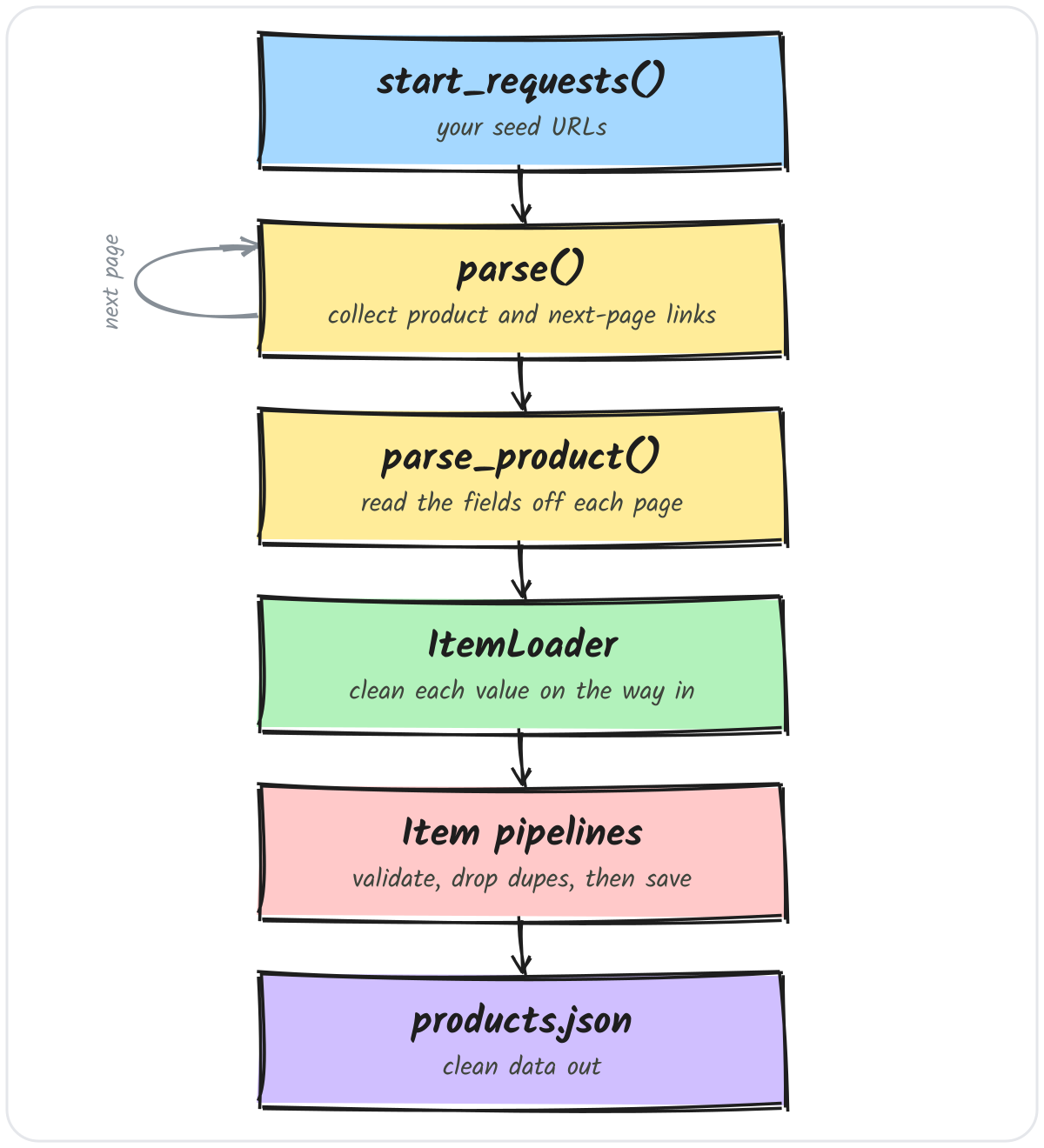
Here is the whole flow before we build any of it. A request goes in at the top, and clean data comes out the bottom.
The series
- Part 1: fundamentals (this one)
- Part 2: advanced scraping techniques
- Part 3: anti-detection and scaling
- Part 4: data processing and storage
- Part 5: production deployment
What scraping actually is
A scraper is a program that fetches web pages and pulls out the specific fields you care about. Nothing more mysterious than that. You point it at a page, tell it “the price lives in this element,” and it hands you the number.
People reach for it in a few common places. Online stores want to track competitor prices, watch stock levels, or build a product catalog from several sources. Real estate teams collect listings and watch how prices move. Newsrooms aggregate stories and follow coverage of a topic. Researchers gather papers or public posts to study at scale. The technique is the same every time. Only the fields change.
The rules before the code
I have had this bite people, so read this part even though it is not code.
Check robots.txt and read the site’s terms before you start. Scrape slowly enough that you are not a burden on the server, because a scraper that hammers a site is both rude and easy to block. Be careful with anything personal, and stick to data that is public. When you plan a large crawl, it is often worth a short email to the site owner first. None of this is legal advice, but it keeps you on the right side of most trouble.
Scrapy helps here. It reads robots.txt for you when you ask it to, and it can throttle itself so you do not have to babysit the request rate.
Setting up
Start with a clean virtual environment so this project’s packages do not leak into anything else.
python -m venv .venvsource .venv/bin/activate # Windows: .venv\Scripts\activatepip install --upgrade pippip install scrapyThen let Scrapy lay out the project for you and add a couple of folders for output.
scrapy startproject webscrapercd webscrapermkdir -p data/raw data/processed logsWhat Scrapy generates looks like this. The files that matter for now are items.py, pipelines.py, settings.py, and the spiders folder.
webscraper/├── scrapy.cfg└── webscraper/ ├── items.py # what a record looks like ├── pipelines.py # what happens after extraction ├── settings.py # how the crawl behaves └── spiders/ # the crawlers themselvesSay what you want: items
Full file: webscraper/items.py
An item is the shape of one record. Defining it up front keeps your fields consistent and gives you one place to clean each value. The nice part of Scrapy items is the processors. MapCompose runs a cleaning function on the way in, and TakeFirst grabs the first non-empty match so you do not carry lists around.
import scrapyfrom itemloaders.processors import TakeFirst, MapComposefrom w3lib.html import remove_tags

def clean_price(value):    if value:        cleaned = ''.join(c for c in value if c.isdigit() or c == '.')        try:            return float(cleaned)        except ValueError:            return None    return None

class ProductItem(scrapy.Item):    name = scrapy.Field(output_processor=TakeFirst())    price = scrapy.Field(        input_processor=MapCompose(clean_price),        output_processor=TakeFirst(),    )    url = scrapy.Field(output_processor=TakeFirst())
The full file carries the rest of the fields, like brand, rating, images, and a timestamp. The pattern repeats, so once you have seen three fields you have seen them all.
The spider
Full file: webscraper/spiders/ecommerce_spider.py
The spider does two jobs. It reads a category page and collects the links to each product, and it reads a product page and pulls out the fields. Splitting those into two methods keeps each one easy to follow.
def parse(self, response):    for link in response.css('.product-item a::attr(href)').getall():        yield response.follow(link, callback=self.parse_product)
    next_page = response.css('.pagination .next::attr(href)').get()    if next_page:        yield response.follow(next_page, callback=self.parse)
parse follows every product link, then looks for a “next” link and follows that too. That second yield is the whole of pagination. Scrapy keeps calling parse on each new page until there is no next link left.
The product page is where the extraction happens. Two habits here have saved me more times than I can count.
The first is fallback selectors. Sites change their markup, and often more than one layout is live at once. So I give the loader more than one selector for the important fields and let it take the first one that hits.
loader = ItemLoader(item=ProductItem(), response=response)loader.add_css('name', 'h1.product-title::text')loader.add_css('name', '.product-name::text') # fallbackloader.add_css('price', '.price-current::text')loader.add_css('price', '.current-price::text') # fallbackThe second is JSON-LD. A lot of stores ship a clean block of structured data in the page for search engines. When it is there, it is far more reliable than reading text out of divs, so the spider reads it and fills in anything the selectors missed.
scripts = response.xpath('//script[@type="application/ld+json"]/text()').getall()Clean it on the way in: item loaders
The loader is the bridge between the page and the item. You feed it selectors, and the item’s processors clean each value as it arrives. That means your spider stays about “where is the data” and the cleaning lives in one place instead of being smeared across the parse method. By the time you call loader.load_item(), the record is already tidy.
Pipelines: check, dedupe, store
Full file: webscraper/pipelines.py
Every item the spider yields runs through the pipelines in order. This is where you catch bad records before they reach your files. The project has four small pipelines, each with one job.
class ValidationPipeline: def process_item(self, item, spider): adapter = ItemAdapter(item) for field in ('name', 'url'): if not adapter.get(field): raise DropItem(f'Missing required field: {field}') return itemThe first checks that the required fields are there and drops the record if they are not. The next filters out duplicates using the name and URL. The third writes the results to a JSON file. The last counts what came through and prints a short summary when the crawl ends, which is handy for spotting a run that quietly scraped nothing.
You switch them on in settings.py. The numbers set the order, low to high.
ITEM_PIPELINES = { 'webscraper.pipelines.ValidationPipeline': 300, 'webscraper.pipelines.DuplicationFilterPipeline': 400, 'webscraper.pipelines.JsonWriterPipeline': 500, 'webscraper.pipelines.StatisticsPipeline': 600,}Settings worth knowing
Full file: webscraper/settings.py
Most of the defaults are fine. A few settings are worth setting on purpose from day one.
ROBOTSTXT_OBEY = TrueAUTOTHROTTLE_ENABLED = True # slow down when the site doesDOWNLOAD_DELAY = 1 # a floor between requestsRETRY_TIMES = 3 # retry the usual transient failuresAutoThrottle is the one I would not skip. It watches how fast the site responds and backs off on its own, which keeps you polite without hand-tuning delays.
Running it
scrapy crawl ecommerce # run itscrapy crawl ecommerce -o products.json # run and dump to a filescrapy crawl ecommerce -L DEBUG # run with loud loggingThere is also a small run_spider.py if you would rather start the crawl from Python and pass settings in code.
Test it without hitting the network
Full file: tests/test_ecommerce_spider.py
You do not need a live site to test parsing. Build a fake response from a string of HTML, run it through the spider, and check what comes out. These tests are fast and they do not depend on a site staying up.
def test_parse_product(self): html = '<h1 class="product-title">Test Product</h1><span class="price-current">$99.99</span>' response = HtmlResponse(url='http://example.com/p/1', body=html.encode()) item = list(self.spider.parse_product(response))[0] assert item['name'] == 'Test Product' assert item['price'] == 99.99Notice the price comes out as the number 99.99, not the string $99.99. That is clean_price from the item doing its job before the value ever lands in the record.
A few things I learned the hard way
Give your important fields a fallback selector. The extra line costs you nothing and saves a 2am fix when the site ships a redesign.
Read JSON-LD when it is there. It is cleaner than scraping visible text, and it tends to survive layout changes that break your selectors.
Turn on AutoThrottle and keep a delay. A fast scraper that gets you blocked is slower than a polite one that keeps running.
Watch the item count at the end of a run. A crawl that finishes with zero items is usually a changed selector, not an empty site.
What is next
Part 2 moves past the basics: pages that need JavaScript, logging in, forms, and the AJAX calls behind dynamic content.
If you want to try this yourself first, clone the repo, point the spider at a simple store you like, and get the name and price out. That one exercise teaches more than reading ever will.